
Workdash 0.3.0 a shared control plane for me and my agents
Workdash 0.3.0 release introduces remote control to allow agents to control agents acting as a foundation for agents swarms

Over the course of the past few months, Workdash has become my primary tool to coordinate my daily work and orchestrate my activities:
Every morning I wake up and refresh workdash to check what needs my attention
I fire analysis, development sessions and editors for all my tasks via workdash
I create generic tasks (that don’t depend on any specific project) in a dedicated github repository that has no code, but just issues so that they appear in workdash.
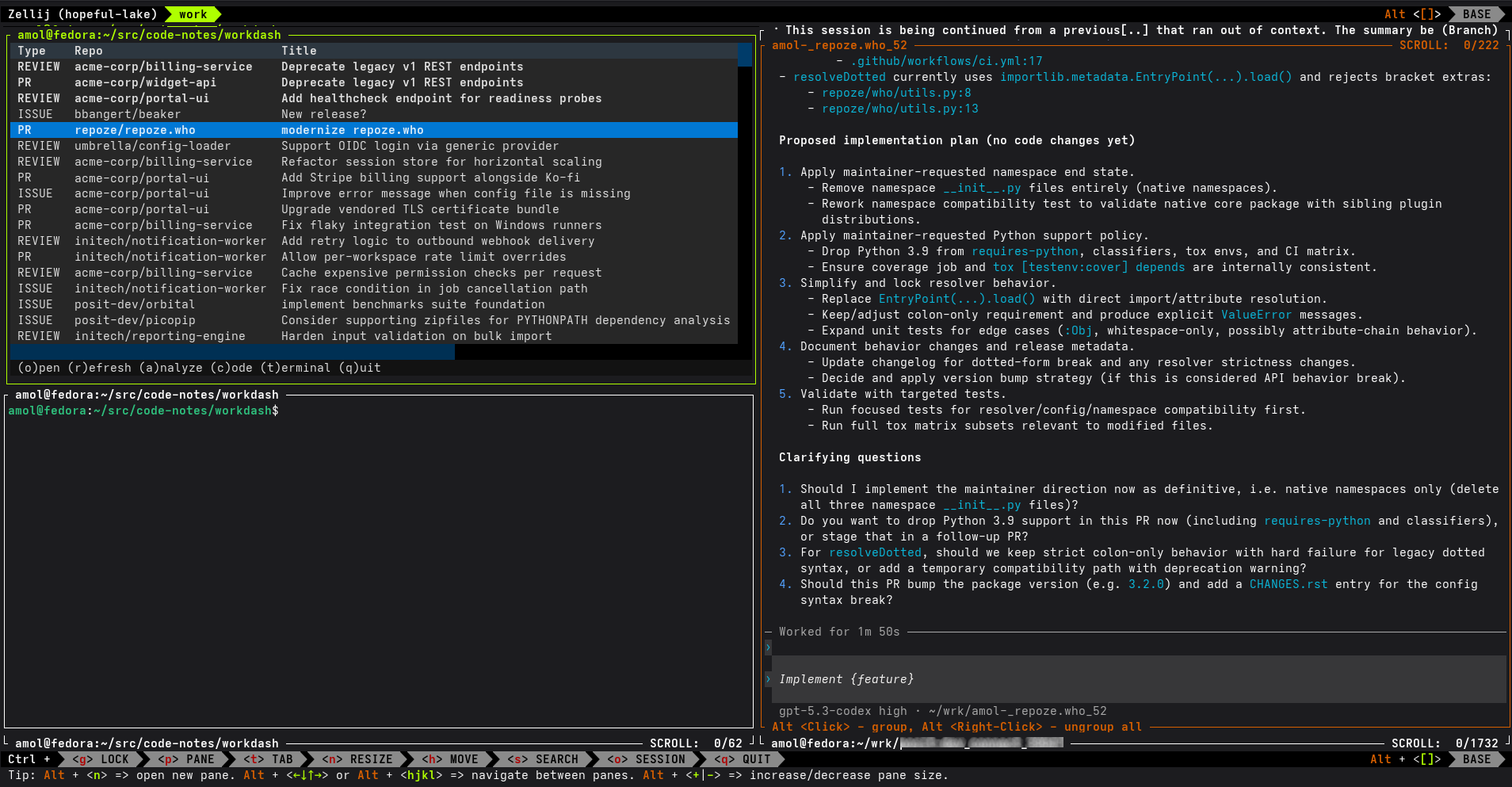
The main struggle I had was that whenever I wasn’t at home, it was not very convenient to connect via SSH and attach to the session to see what was going on and eventually tackle some activity.
Also, reading the content wasn’t very convenient on a mobile phone, and required me to go through it all to understand what was going on.
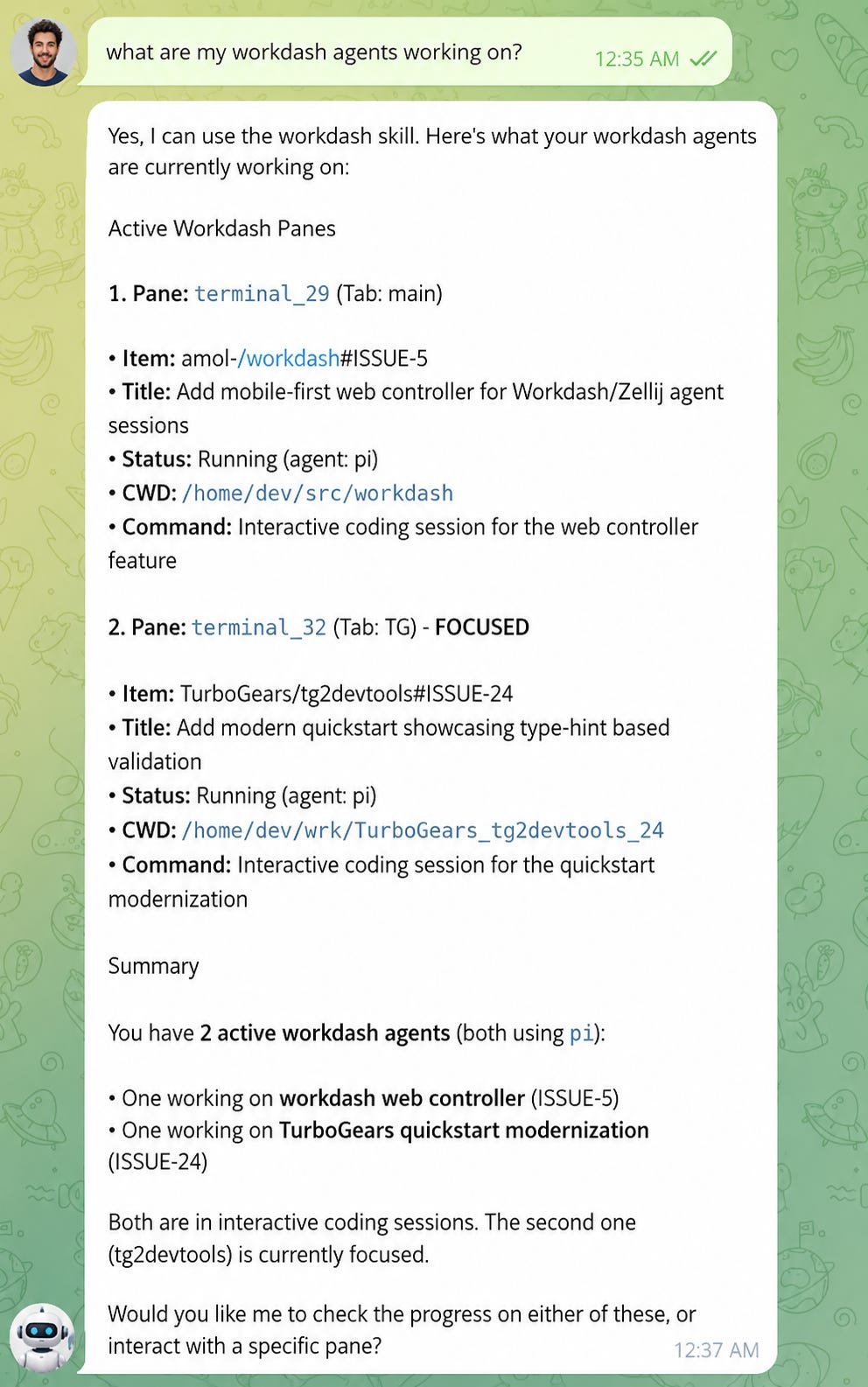
I realized that it would have been very convenient to be able to interact via my personal assistant agent with all the work that was going on in workdash, so that I could ask about tasks, coding sessions and summaries to my personal assistant and have it send and receive messages from the agents running inside workdash itself.
I could have done this with some complex dark magic using Zellij to read and write content to each pane, but that meant it was fragile as it had to parse the TUI of workdash, and it was also a security issue as my personal assistant needed to be able to attach to the zellij session and thus run as the same user. Even if I used zellij remote RPC, they weren’t very convenient as they were not designed for this.
So, for the next release of workdash the goal was clear for me: “Allow my personal assistant to access workdash and control it”
Workdash CLI
Something that agents are very good at, is using command line tools.
So the first step was to provide a set of command line tools that the assistant could use to ask for issues, manage the issues, check which coding sessions were going on, open editors to apply changes, interact with the other agents in these coding sessions, download the issue analysis and PR reviews and so on…
So workdash, had to grow a CLI that the agent could use to interact with the TUI
  {list,info,analyze,code,read,write,show-config}
    list                List current Workdash items without launching the TUI.
    info                Report live Workdash-owned Zellij panes.
    analyze             Analyze a current Workdash item.
    code                Launch a terminal-backed coding agent for a current Workdash item.
    read                Read text from a live pane.
    write               Send text to a live pane.
    show-config         Show configured agents and the fixed server address.
for example, workdash list could give my assistant a way to know all the tasks that I had to work on
$ workdash list
ISSUE   amol-/code-notes#ISSUE-5        2026-06-07 import export cards for sailcards
ISSUE   TurboGears/tg2devtools#ISSUE-26 2026-06-06 api quickstart
ISSUE   amol-/workdash#ISSUE-7          2026-06-02 Configure the command used to open URLs
...
and workdash code could give my assistant a way to spawn an agent to do the work in a dedicated Zellij pane, so that when I came back at home I would just find it in my laptop terminal
$ workdash code 'amol-/workdash#ISSUE-7' --agent piWorkdash Server
One limitation of the CLI is that it would have to run under the same user of the agent using the CLI. Something I didn’t want to allow. My personal assistant agent runs with a restricted user in my home server, it can’t do much directly and I didn’t want to move it to the same user that I use for development.
Also, the fact that the commands had to reload the state of the dashboard each time was a significant performance bottleneck. I didn’t want to wait for 30 seconds every time I asked something to my personal assistant.
The solution has been to turn the CLI into exclusively a client for an already running workdash. The workdash would keep the state in memory and would coordinate all actions, while the CLI simply contacted the workdash and asked it to act or to provide information.
For my use case, remote access wasn’t necessary. The assistant and the workdash run on the same exact host, and it’s a host exclusively used by me and no other users. So allowing to listen exclusively on localhost was an acceptable compromise in terms of security. If in the future this has to listen on even just a local network, an authentication workflow will have to be implemented, but at the moment the workdash is only meant to act as a shared in-memory state for the CLI, not as an actual remote control API.
As the server speaks JSON, implementing an option to return a computer readable format instead of a human readable one for the CLI was also made significantly easier by the architecture
% workdash list --json
{
  "items": [
    {
      "id": "owner/repo#ISSUE-42",
      "type": "ISSUE",
      "title": "Fix failing deploy",
      "suggested": true
    }
  ...

% workdash info --json
{
  "session": "workdash-a1b2c3d4",
  "panes": [
    {
      "pane_id": "terminal_7",
      "kind": "agent",
      "item": "owner/repo#ISSUE-42"
    }
   ...
All pieces were there, the assistant had a tool to connect to a running workdash, get information in a computer friendly format and thus could give me summaries or overviews of what was going on.
The only remaining piece was to tell the assistant how to use those tools, which is what the workdash-control skill included in workdash itself is meant to do.
# Workdash Control

Use this skill when you may run `workdash` subcommands but should not inspect
Zellij, GitHub, config files, or worktrees directly.

...

# Discover work and panes

```bash
workdash list                 # current item rows
workdash list --refresh       # ask server to refresh GitHub data
workdash list --json

workdash info                 # Workdash-owned live panes
workdash info --all           # include ordinary live non-plugin panes
workdash info --json
```

...
Closing the loop
The agent skill closed the loop and allowed me to interact with workdash in the way you saw in the previous chat screenshot (I replaced the avatars, but the chat content is indeed a real chat between me and my assistant agent).
Now Workdash helps me daily keep up with my work when I’m sitting at my PC. But when I’m away from it, I can ask my personal assistant to interact with the dashboard for me: if I have a sudden idea, want to create a new task to track in the dashboard, want to check what I have to do when I come back home, want to see how an agent I started in the morning is doing, or even want to fire a new agent into its own session so that I can continue the work when I sit back down at my PC.
Once agents can inspect, message, and launch other agents through Workdash, Workdash becomes the coordination layer for multi-agent work.
Slowly, workdash is evolving from a dashboard for myself, to a dashboard that I can share for my own work and my agents’ work. Unlike many other agents coordination tools, workdash doesn’t force me to have two separate workflows and issue trackers for me and my agents. My work is my agents’ work and vice-versa. Sometimes the human offloads work to agents, sometimes the agents offload work to the human.
This allows me to “collaborate with my agents” instead of offloading them work that I have a hard time supervising.